Computer Page
Computer Page
 My Weekend Installing
Windows Vista Home Basic
My Weekend Installing
Windows Vista Home Basic
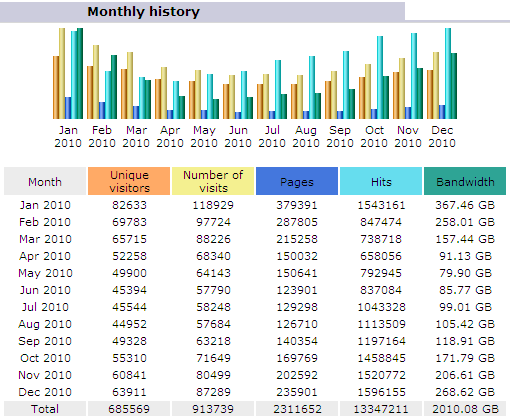
www.VarmintAl.com traffic
for 2010
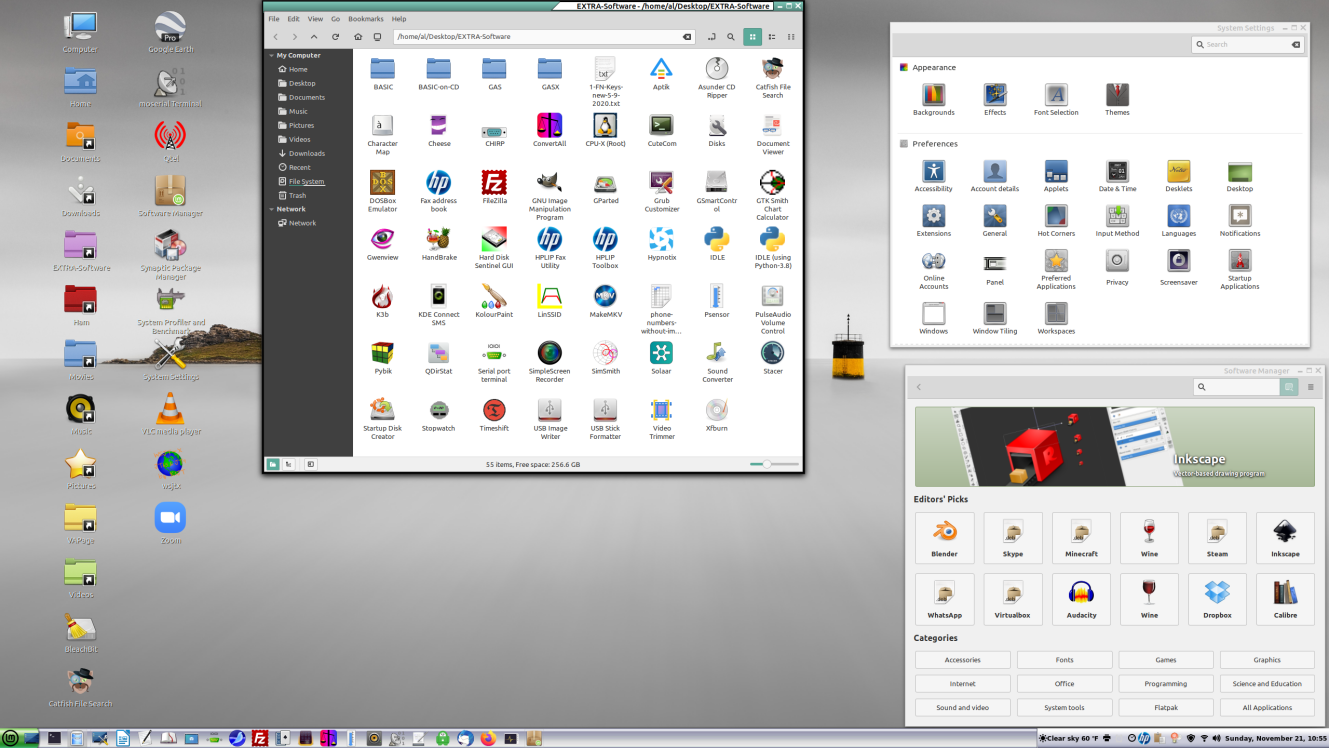
Since Windows XP's EOL (End of Life) I have been
converting my computers over to FREE Linux
Mint 20.2. The picture above shows some of the features on
Linux Mint Cinnamon I currently use. Note that there many free
software packages currently available for the Linux Mint operating
system. I can install the Linux Mint operating system on one
computer and then take the hard drive and duplicate it and plug it
into another computer and Voila! it runs on the new computer
without "authentication" like Microsoft's Windows demands. There is
no need to hunt for drivers for the hardware. All of the drivers
for almost all computers are contained in the Linux
kernel.
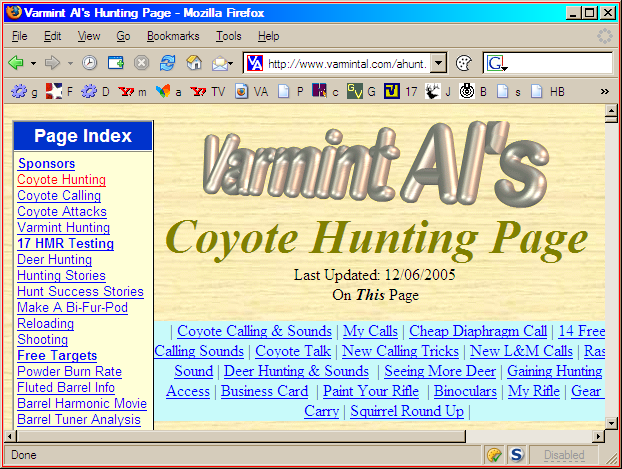
FIREFOX IS MY BROWSER.... Here is a screen shot. I bit the bullet, so to speak, and tried the Mozilla Firefox freeware browser. I have been using it for about 18 months. My opinion of Firefox is that it works very well. It allowed me to import my favorites when it installed. It also uses my Outlook 2000 mail service with a link at the top. My wife, Mary Ann, is using it too and she doesn't understand computers very well and is fine with it. I even took the Microsoft Internet Explorer Icon off my desktop and put it in the "Seldom Used" folder. I see no need to go back to IE. The only time IE is used is when I do a search for critical updates and the search automatically runs IE. Here is a small screen shot of Firefox with the "personal links bar" on the top. I made the picture small to save picture size. Note the GV link is this Go Go Varmint Go message forum. Firefox seems to be faster than IE and is very easy to setup. Note the Cookie Button and NoScript button in the lower right of the screen shot. The Cookie Button allows me to accept or reject cookies on the fly. The NoScript allows me to accept or reject Java Script on the fly.
MOZILLA FIREFOX IS FREE....
 is free software for better
computer security. Good people have worked hard perfecting
it.
is free software for better
computer security. Good people have worked hard perfecting
it.
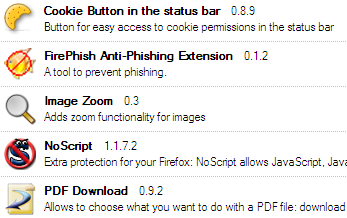
FIREFOX EXTENSIONS.... Here are the FireFox extensions I am
currently using. You can easily install/uninstall extensions by
going to Tools and clicking on Extensions. There are numerous
extensions available and these seven I find very useful. I
especially like the Image Zoom, NoScript, and
Cookie Button. The Cookie Button and NoScript allow
accepting or rejecting scripts and/or cookies, on the fly, right
from the status bar. The status bar icons also indicates if
scripts and/or cookies are being blocked with little red
symbols.
VIEWING LARGE/SMALL PICTURES.... It is very annoying to view a large picture on a web page where one has to scroll right/left to view it. If you load the Image Zoom extension, it handles it very nicely. You can make any picture fill the screen. It shrinks large pictures and expands small pictures. Here is how it works.
Voila! The picture fills the screen.
No more scrolling right or left to see part of a large picture! If you want the picture back to the original size you can Refresh the page or Right Click on the picture and let it up and the menu will appear. Left Click and select Zoom from the menu and take view 100%.
PREVENT COOKIES WITH FIREFOX.... The View Cookies allows me to prevent certain cookies from ever being written to my computer. To use View Cookies, you will need to go to Tools, then Page Info, then the Cookies Tab at the top. You will get a list of the cookies that particular page has written on your computer. You can then Remove Forever each cookie. It really works very well. If you prevent a cookie from ever being written and it is one you really need. You can go to Tools, Options, Privacy, and Click on the word Cookies. Then click the View Cookies tab. You can remove the blocked cookie from the list. For example, I blocked msn.com from writing cookies, and then I could no longer read my Hotmail. It was easy to delete msn.com from my blocked cookie list.
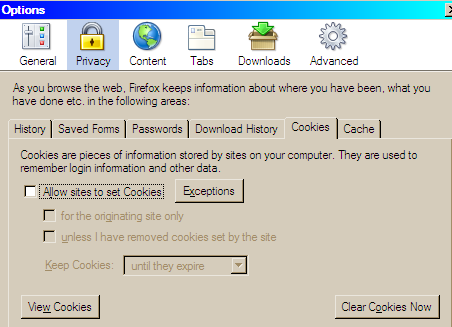
WINNING THE COOKIE WAR.... To PREVENT COOKIES WITH
FIREBOX uncheck the Allow Sites to set Cookies. The
Cookie Button down at the lower right corner of the task bar will
include good cookies in the Exceptions automatically.
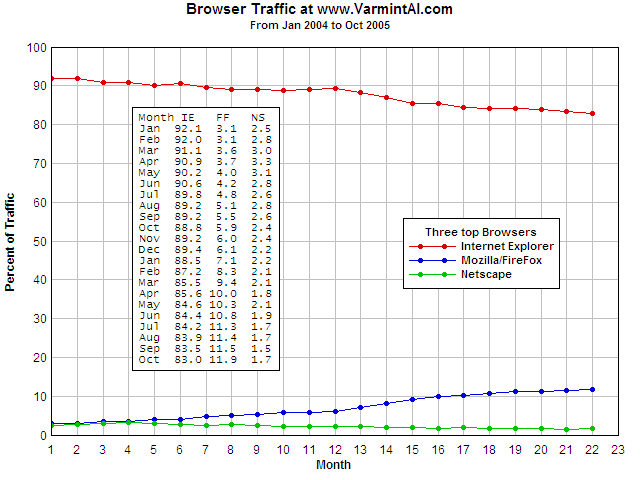
BROWSER TRAFFIC.... Here is a plot showing the percent of
page views for each of the three main browsers. The data are taken
from the >2,000,000 page views for my www.varmintal.com site over the 22
month period. FireFox is on the rise. Internet Explorer and
Netscape are losing ground. What is that saying and it could be
applied to FireFox? "If you build it, they will come."
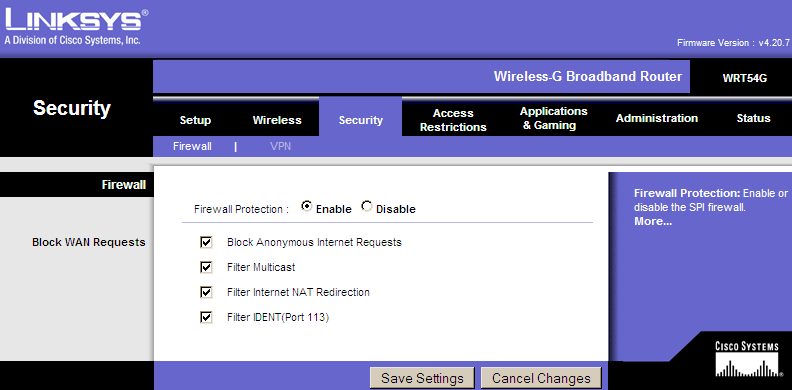
RUNNING A FIREWALL/ROUTER.... I am using a Linksys
WRT54G wireless/router and it works great. To control it, I
connect to it as if it were a web page. If you are running a
Linksys router click on http://192.168.1.1 or type it into the
address window on your browser and connect to your router. If you
didn't give it a name, then leave the name blank and if you didn't
give it a password, use admin (all
lower case) for a password. I have setup the security to block
probes as shown. I ran BlackIce for a week after I had the Linksys
running and nothing got past the Linksys for BlackIce to block.
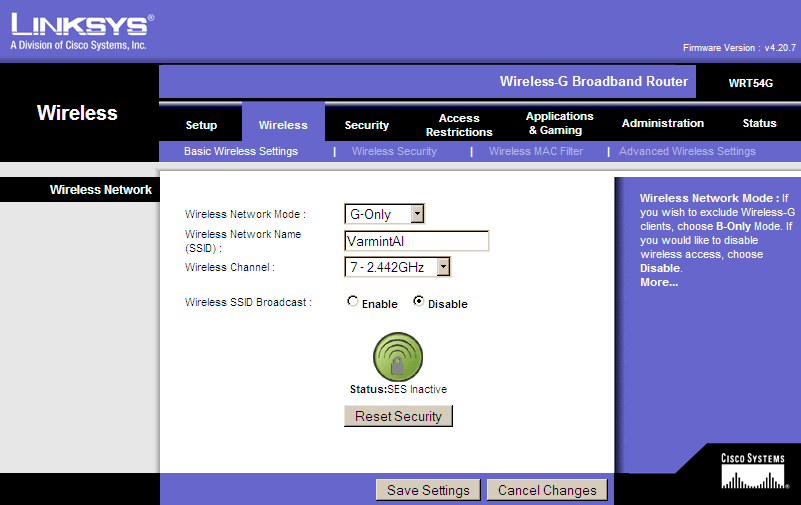
DISABLE SSID BROADCAST.... I am running Wireless to my other
computers. I disable the Wireless SSID Broadcast to make
unauthorized use much more difficult and someone in the area will
not know the name of my wireless router. With the SSID Broadcast
enabled, anyone in the area could connect through my wireless and
were doing so. Once I changed the name and stopped the broadcast,
the unauthorized usage stopped. I do have to enable Wireless SSID
Broadcast when I connect a new computer to the wireless network,
but once connected, I then turn off the broadcast.
 .
. 
 .
.
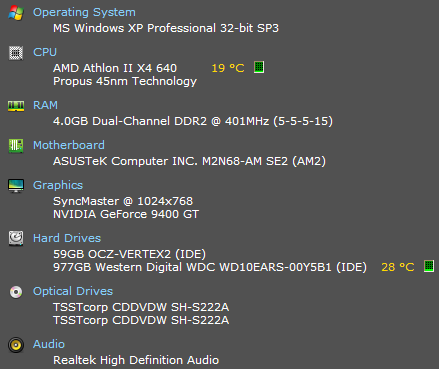
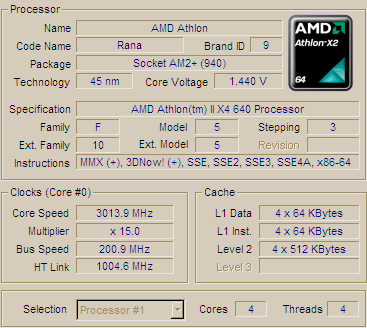
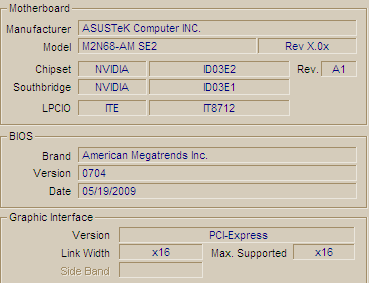
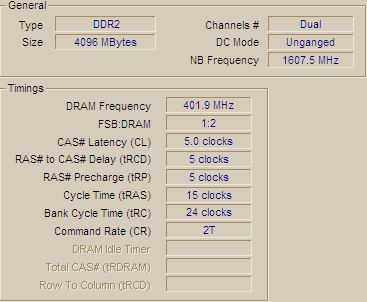
CURRENT COMPUTER.... My current online computer (Y-Machine) is
an Athlon II X4 640 CPU. The Asustek M2N68-AM SE2 motherboard is
lean, mean, and fast. I have 4096 MBytes of ram with about 2500
MBytes usable. The video card takes up 1024Mb of memory address
space on the 32 bit bus. The system clocks out at 3998 MFlops or
about 15 times faster than a Cray 1.

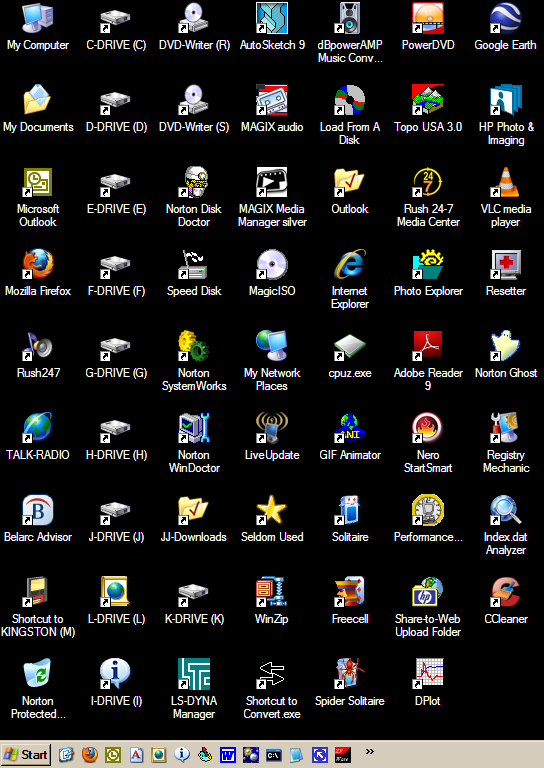
DESK TOP SCREEN SHOT.... Here is a picture of my Desk Top. I like a lot of icon shortcuts on the
desktop as you can see. These are very useful tools. I have even
more shortcuts in the Seldom Used folder.
Microsoft Most Valuable Professional It can be very
helpful, but... Info that could also really get you in trouble.
Information
on BIOS Parameters. Very useful when you are into the BIOS and
want to know what each parameter means and does.
| A golf
course is a sad misuse of a perfectly good rifle range. Gun control
is like trying to reduce drunk driving by making it tougher for
sober people to own cars. �Hold my
beer while I run the calculation.� Redneck Engineer The
critical thinking required for engineering analysis is hard work
and like weight lifting for the brain. An
effective way to deal with predators is to taste terrible. "Extremism
in the defense of liberty is no vice. Moderation in the pursuit of
justice is no virtue." Barry Goldwater "It is easy
to take liberty for granted, when you have never had it taken from
you." Dick Cheney "The only
people who have quick answers don't have the responsibility of
making the decisions." Justice Clarence Thomas |
HOW MY COMPUTERS COMPARE.... I have a number of computers as backup and FEA platforms and here is how they compare to each other for speed:
I-Machine EPoX 8RDA3+ Pro Motherboard WindowsXP C-Machine EPoX 8RDA+ Pro Motherboard WindowsXP Pro Mary Ann's computer Dan's P4M800PRO-M V1.0A |
OLD INFO.... I have an even faster computer. It is an Athlon 1.4GHz with 256 Mb SDRAM, 40 Gb HD, CD-ROM DVD, HP CD-
writer. It came running Win ME and I now have my old Win 98SE operating system loaded on it. It seems
to be a very solid system. I have Norton SystemWorks 2001 installed and have my complete system backed up
with the Ghost software. It is very comforting to have it all on CD-R CD's ready to load incase the
HD dies or I foul up with Partition Magic or some such foolishness.
Some time ago, I had a very fast new computer. It was faster than the old 200 MMX. Here are the
specifications on the old computer. It is a TIGER TS3-M-3D $1469.99
Pentium II 450 MHz MMX System with a 100 MHz bus
128 MB PC100 SDRAM
32X CD-ROM
HP 8100i 4X Write 6X Read CD Writer
10.2 GB Ultra DMA/33 Hard Drive
3D AGP Video w/8MB SGRAM
Intel 440BX Chipset
56K Faxmodem w/Speakerphone & Voice
Yamaha 128-Voice WaveTable 3D Sound
Amplified Stereo Altec Speakers
PS/2 IntelliMouse
With all this speed, I still can't run my Finite Element Calculations any faster than the old
486/33C because there is a DOS emulator in Win98 that is very slow. I am still investigating
ways to add a second operating system so I can boot to Win98 or DOS 6.22. I have given up on the
dual boot system. I have been able to run DOS 6.22 on the Pentium II 450 MHz MMX computer with
no increase in speed. It appears that the heavy use of the FPU and the 8bit memory manager uses
the CPU in very inefficient ways that brute force speed will not overcome. I still have the P5-
200 MHz MMX to run the software when needed.
I built my old computer from parts:

CPU Pentium 200 MMX with a 66MHz bus
PA-2006 motherboard, 4 PCI, 4 ISA, 2/72SIMM, 2/168DIMM, VIA 580VP chip
set, 2 serial, 1 parallel, PS/2 mouse, 512K Burst Cache, Award Flash
BIOS, Tiger Direct mid tower case, 230W power supply, 3 5" bays, 2 3"
bays, 4 internal bays.
64Mb SDRAM consists of 2 ea. 32 Mb DIMMS 12 ns
2.7 Gb Maxtor Hard Drive
Q-80 2120 tape drive
1.44 Teac floppy drive
8x CD-ROM CRD-168P drive NewCom
Sound Card 1853 NewCom
33.6K Modem 336ifxv Data/Fax/Voice NewCom
PCI Video Card Stealth 3D 2400XL 4Mb EDO DRAM
SONY 200SF 17" monitor
AnyKey KBD (programmable)
Microsoft Intellimouse PS/2 mouse
----------
I have tried over-clocking the bus to 75 MHz and everything worked fine
but the heat sink over the CPU seemed to be quite a bit hotter than with
the 66 MHz bus, so I set it back to 66 MHz.

I have the Livermore Software Technology Corporation finite element
software for performing engineering analysis and have used the bolt
stress calculation for a benchmark. This benchmark primarily tests the
speed of the FPU. Most other benchmark programs test the graphics
speed. If you are interested in testing your computer, let me know by email.
Here are the results for a number of computers that I have tested
and estimated. A smaller number is better. I used my old Gateway
2000 P5-100XL for a standard.

My B440T Benchmark with Bench.exe disk.........

CPU                                    Seconds Relative Rating
-----------------------------------------------------
P5-250MHz MMX PA2013  100MHz Bus         54.56  0.527
AthlonXP 2700 EPoX 8RDA-Pro 333 Bus      64.10  0.619
AthlonXP 3000+ EPoX 8RDA-Pro 333 Bus     69.59  0.672
P5-200MHz MMX PA2011  66MHz Bus          75.25  0.727
P5-200MHz MMX PA2006  66MHz Bus          76.30  0.736
P5-166MHz MMX                            81.800 0.790
P5-133 (75MHzBus)                        81.891 0.791
P5-133 (66MHzBus)                        91.890 0.887
P5-100XL                                103.539 1.000 Standard
Duron 1.8GHz XFX KT-40A-ANH 166 Bus     111.773 1.080
Athlon 1.4Ghz MS 6330 intlaced mem      121.488 1.173
6x86 P150+                              126.550 1.222
Athlon 1.4GHz MS 6330 266MHz FSB        131.710 1.272
Athlon 850MHz ASUS A7V 200MHz FSB       158.350 1.529
Pent 4 Dell 8100 1.5GHz 400/Bus         170.711 1.649
Celeron 1.0GHz                          184.100 1.778
Pent III 550MHz 100MHz Bus              189.    1.825
Pent 4 Dell 8100 1.5GHz 400/Bus         196.221 1.895
GW G6-450 Pent II 133                   349.770 3.378
Pent II 450MHz 100MHz Bus               351.301 3.393
486/33C                                 353.070 3.410
HP Pavil Celeron 500MHz 6633C           368.111 3.555
486/33C Lee's                           373.820 3.610
486/66V                                 393.050 3.796
Celeron 466MHz 100MHz Bus               393.59  3.801
486/66 NoteBk                           741.381 7.180
386/25 w/mathc                          757.593 7.316
-----------------------------------------------------

Trials and Tribulations.

I had the system all put together and could boot it from a floppy and
run the bench mark test. I purchased Win95 on a CD and the CD-Drive manual
assumed that Win95 was already installed! Catch 22! All that came with
the NewCom CD-Drive for installing it was a CD. I fired up the old P5-
100XL and went to newcom.com on the internet and found their DOS CD-Drive
driver and downloaded it, unzipped it to a floppy and installed the DOS
CD-Rom drivers on the new computer. Then I was able to install Win95. What
would have taken a week of phone calls and waiting for floppies in the
mail took 15 minutes! The great computer age is here!

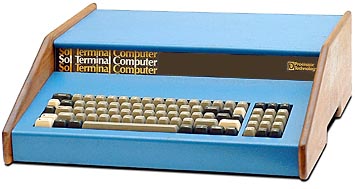
MY FIRST PC.... I got my first PC in the late 70's. It was a
SOL Computer based on an Intel 8080 CPU with 8K
of 8 bit memory and a cassette tape for storage. For software, I
had one basic program loaded on the tape plus TREK. My boy played
TREK 2 days straight, that's 48 hours! He learned all the commands
by trial and error, except one about the photon torpedoes. To
program in BASIC, I had to load the program plus BASIC and delete
each line, then write a new program and save it back on tape. I
finally got smart and saved a BASIC file with a one line program. I
bought the SOL Computer as a kit for about $2000 and paid another
$150 to have the kit assembled. The whole thing was about the size
of a big IBM typewriter. The monitor was an 8 in. black/white. By
the early 80's, I went to a computer fair over in SF and bought a
64K memory card for $599 and didn't know how I could possibly use
all that much memory. I was running CP/M and finally bought a hard
sectored 5-1/4 in. disk drive kit and punched extra holes in the
paper jackets so I could use both sides of the disk. Not only do I
still have the old SOL saved, but I bought a complete duplicate
system in case it ever crashed! (Stupid move).
Web site
about old computers. Very interesting.
25 Random Facts About Old Computers
My First
Computer was a Sol-20. I bought the kit for $1000 and paid $200
to have it assembled.
BUILT A 3 CHIP COMPUTER.... Around 1985, I was building an 8085A dedicated, three chip, computer to keep track of the depth of a bailer used to clean the sand out of oil wells. The computer counted the spokes on the pulley at the top of the derrick as it turned. I wrote the depth calculating code in assembly language and used a single board Z80 computer with a Hex key pad to burn the software into the EPROM's. It would display the bailer depths at cable speeds of up to 500 mph (they couldn't run it that fast) and ring an alarm when the bailer was within 200 feet of the surface and coming up. The big problem was that coming out of the hole, a mile or so deep too fast, the operator would lose track of how close the bail was to the surface and the rig would try to wrap the bail around the top pulley before they could stop it.
COMPUTER FOR KINDERGARTEN.... Next I got a Vic 20 and it was like a toy. I programmed the kids names in it for wife's kindergarten class and it gave them a "hooray" if they spelled their name correctly or a "raspberry" if they spelled it incorrectly.
CONSULTING WORK BEGINS.... When I retired from the lab in 1990, I purchased a Gateway 2000 386/25MHz with 8Mb ram and a 210 Mb Hard drive. I was able to get the finite element software that was exactly the same as that used on the Cray Computers at the lab, only compiled for a PC. I started doing engineering analysis consulting work at home.
PREVIOUS COMPUTER.... Now, my P5 200 MMX with 64Mb ram and a 2.7Gb hard drive is equivalent to about 20% of a Cray 1 in computing speed. I can essentially do the very same calculations that I used to do with the XMP and YMP Cray's only it just takes a little longer and I can't run 3D calculations with more than about 2500 elements. I also use my computer and a KAM+ TNC (Terminal Node Controller) into a ICOM-281H 2 Meter FM radio for my Packet Radio Station. Computers sure have come a long way in just a very few years. I am building another 200 MMX from parts with the new Mpact! Card that contains a video card, sound card, and modem all on a single card. The latest computer is an Athlon 1.4GHz with 256 Mb RAM, a 60Gb HD and a DVD-CD ROM plus a CD-Writer. PROGRESS! Good Computing from Varmint Al
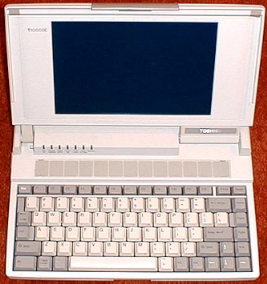
MEMORY LANE.... Some things are new, but it is fun to play around with the old computers too. In its day, I think a Toshiba T1000SE laptop cost about $1000. Now, they are not so expensive. You DOS users, take a trip down memory lane....
SHERMAN TANK OF LAPTOPS.... The Toshiba T1000SE Laptop
computer. These are the Sherman Tanks of old Laptop
computes. They are perfect for portable packet. They appear on
eBay for auction form $10 to $20+ and are well worth it! If you
grew up with DOS, it will bring back fond memories of the Good Old
Days. The Toshiba T1000SE's model number is PA8003U. They use a 7.2
Volt battery pack PA8812U and the AC adapter is PA8713U or the AC
adapter PA8706U is a little larger, but will also work. If you are
really lucky, and can find a 2Mb memory card PA8312U, then you can
create a 3Mb Hard Ram Drive and run just about any DOS based
terminal program from the Ram Drive on them. Here are the
specifications on the Toshiba
T1000SE. If anyone has more information on the new price of a
Toshiba T1000SE Laptop when they were first introduced, I would
sure like the information so I could post it here.
Norm (NO7RM), another ham radio operator, purchased a new Toshiba T1000SE from Whole Earth Access in the San Jose, Calif. area on March 22, 1991 for $1029.29. He also purchased the three position battery charger and a spare battery for $271.78. Norm says that these may have been discount prices.
You wanted to know the original market price of the computer. I got mine on 7/17/90 for $1,285.93, brand new, of course. --- Mike O'Connor
|
|
Toshiba T1000SE Features
|
Here is a list of the files that are on the T1000SE's ROM:
r> Config.sys Print.comAutoexec.bat Graphics.com
Assign.com Keyb.com
Ansi.sys Keyboard.sys
Backup.com Label.com
Biosver.com Mode.com
Chad.com More.com
Chkdsk.com Nlsfunc.exe
Command.com Now.com
EXPERIENCE WITH THE T1000SE.... I run the Setup10.com program and set aside 380K of ram for the Hard Ram Drive and then format it with the format d: command. The T1000SE allows you to copy the autoexec.bat file over to the Hard Ram Drive D:\ and customize it. When it boots up, it looks to see if there is an autoexec.bat file on the D: drive and uses it. I was able to find my old Norton Utilities 3.1 floppies (on a 5-1/4" floppy) and copy them over to a 3-1/2" floppy so I can use them on the T1000SE. They work great. One thing I have found out is that inside the computer there is a 3/8" dia by 8" long 6V Sub battery that is usually dead. Its only function is to provide power when you change batteries so you won't lose your Ram Drive. If you leave the 12V power supply plugged in and switch batteries with he computer tuned off, it seems to preserve the Ram Drive. The dead Sub battery will drain the main battery when the compute is not in use because it appear as a dead short. I just remove the Sub battery and the computer works fine and the main battery lasts much longer. I have yet to find a Toshiba T1000XE (with a 20Mb HD and no floppy) or a T1000LE (with a 20Mb HD and a 1.44Mb floppy) that works. These two models are not worth the expense or trouble in my view.
SOFTWARE TO GET STARTED ON PACKET.... If you get a Toshiba T1000SE and want to operate 2m Packet Ham Radio with it, here are four files that will get you on the air with a KPC-3 and a 2m transceiver:
pacfast.exe The smallest packet
terminal program I have found and it is very easy to use. F1 gives
you all the commands.
go1.bat A batch file that starts pacfast
running at 9600 baud on com 1 (default setting for the
T1000SE).
ted.com The tiny editor for use on old DOS
systems. It works very well.
scan.com A tiny program <1K for reading
text files. To view a text file, merely type SCAN name and use the
arrow keys and Page Up and Page Down keys. Esc to exit.

TOSHIBA T1000.... Before I found out about the Toshiba T1000SE, I was using a Toshiba T1000 for portable packet. Here is the story of the T1000. For old time DOS users, it will bring back old DOS memories. There is a Toshiba T1000 Web Page. If you have a Toshiba T1000 it is worth checking out.
You aren't going to believe this. I bought a $10 1987 vintage
Toshiba T1000 laptop at the Livermore Ham Swap Meet. The Ni-Cad
batteries were 0 Volts and completely dead and looked like a dead
short. The first process was to hit the battery pack with 12V and
give them a good jolt. Well, then I put a 9V charger on the T1000
for about 4 hours. When I turned it on, it signed on and booted
from ROM. It is running DOS 2.11 (a very primitive DOS, not quite
stone age, but more like the bronze age).
Then I looked for some terminal program and it has none. No BASIC
either. It does have a old 720Kb floppy drive. So I got out my
QRZ CD and found the simplest and smallest packet terminal
program on the CD. It is PACFAST.EXE. I tried out the program on
my Pentium and it worked OK. Not a lot of commands, but it would
talk to my KPC-3 TNC.
I found an old style 720Kb floppy and formatted it on the T1000.
It worked and took a long time to format. Then I wrote the
PACFAST.EXE program on the floppy from my 450MHz Pentium II
using DOS commands in a DOS window. The new Win98 software is
downward compatible to correctly write the old style floppies.
Good news.
I hooked power to a spare KPC-3 I have and hooked a serial cable
from the TNC to COM1 on the T1000. Now the big test. I put the
floppy in the T1000 and did a CD A: command and got the A> prompt
and then executed the PACFAST.EXE com1 9600N81 program with the
attached commands and it worked! The KPC-3 signed on and I
entered the disp command and it listed the TNC command display
list. I have to admit that I have been working on this all day,
but it was fun to get success.
Last Updated:
4/29/2021
End of Page.